
Juice Jacking — Genuine threat or cybersecurity myth?

While proof of concept hacks are real, demos and warnings are not the same as attacks in the real-world.

Key takeaways
Juice jacking is what happens when hackers modify public charging stations to steal data from or install malware on smart devices. Although no real-world attack has ever been documented, researchers continue to prove it’s technically possible; most recently in a 2025 study on “ChoiceJacking.” Fortunately, iPhones (iOS 18.4+) and Android 15 devices have strong protections built in. And there are several simple and free precautionary steps you can take to stay extra safe.
Battery drain is the price we pay for the convenience of having a powerful smartphone in our pocket, to use whenever we need it. That’s why we usually keep them plugged in and charging at home. But at the airport it’s another matter. If your battery is in the red zone and you only have a digital boarding pass to hand, finding a charging point becomes an urgent priority.
But didn’t the FBI warn about juice jacking attacks happening at public USB points? Have there been actual documented cases? And is it still a threat in 2026? Read on for all the answers.
What is juice jacking?
Juice jacking is a cyberattack in which a compromised public USB charging port or cable is used to install malware on a phone, or steal its data while it charges. Because USB connections carry both power and data, a rigged charger/cable can attempt a data connection without the owner realizing it.
Where the warnings came from
Juice jacking has been around as a term, and defined as a threat, since 2011 when a group of researchers demonstrated a proof of concept (POC) attack at DEF CON hacker conference. Periodically, new research and warnings push the threat to the top of the news cycle. In 2018 it was the Trustjacking research, and a year later the O.MG Cable. Authoritative sources including the FBI, the TSA and LA County District Attorney’s Office have repeated warnings periodically in the years since.
However, demos and warnings are not the same as real-world attacks. The bottom line is that, to this date, there have been no confirmed victims of juice jacking. An FCC page on the topic published in 2023 appears to have been removed by the content owner.
So, is juice jacking real? An honest answer
Verdict box:
(1) As a live threat - juice jacking is effectively a myth. No security journalists or researchers have ever found evidence of real-world attacks using public charging points.
(2) As a theoretical capability - it is real. Researchers have repeatedly demonstrated various ways in which attacks could be carried out.
(3) As a risk to you - the threat is minimal, and lowest on an updated phone. The fix costs nothing.
ChoiceJacking: the 2025 twist that changed the conversation
For a decade, your phone’s “Trust this device” (iPhones) or “Charge only” (Android) prompt was the safeguard against juice jacking. As long as you chose “Charge only” or declined to “Trust” the device, the charging port couldn't access your data. But in 2025, Austrian researchers at the University of Technology in Graz changed the narrative.
They showed how a malicious charger could pose as a USB keyboard and be programmed to press “Allow” on your behalf — bypassing the prompt on test devices from major vendors, including one technique that worked on iPhones. That’s why Apple’s iOS 18.4 now requires your PIN or Face ID before a new USB data connection. Android 15 added equivalent protection, though rollout varies by manufacturer.
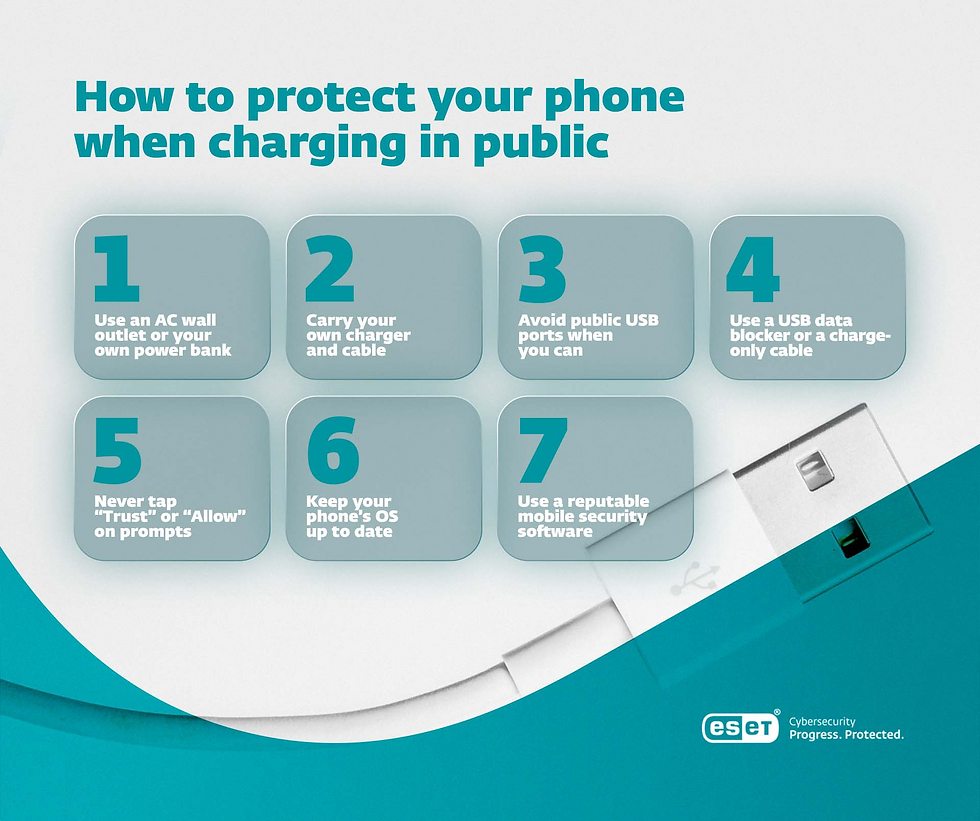
How to protect your phone when charging in public
If you get caught out with a smartphone that’s almost out of battery while you are on the move, always use an AC wall outlet or your own power bank first. For most people that will mean carrying your own charger and cable around with you.
Also consider the following:
If you have to use a public USB outlet, use a USB data blocker (USB condom) or charge-only cable
Keep your smartphone’s operating system (OS) updated
If using a public outlet, never tap “Trust/Allow” on a prompt you didn’t expect
Install mobile security software for any other threats that USB precautions can’t cover
Juice jacking may never have been documented in the wild, but phishing links, malicious apps, scam messages, and device theft are an everyday reality. ESET Mobile Security helps protect your Android phone wherever you travel.
How would you know if you’d been juice jacked?
There’s no reliable telltale sign - which is partly why confirmed cases are so hard to establish. However, you should look out for:
An unexpected trust/data transfer prompt while charging
Unfamiliar “accessory connected” behavior
New apps you didn’t install
Unusual battery drain or data use
If in doubt: disconnect your device immediately, update the OS, run a scan using reputable mobile security software, and change your key passwords.
The airport risks that should actually worry you
There are more pressing cybersecurity risks at the airport than juice jacking. Take time to understand the following ahead of your travels this summer:
Fake public Wi-Fi: Also known as “evil twins,” these are Wi-Fi hotspots set up in busy areas by hackers to mimic genuine wireless access points. Your device may even be automatically configured to connect to them. But doing so will give attackers full control over your traffic, enabling them to steal your passwords and data, and inject malware into your device.
Phishing texts about your flight or booking: This might happen when you’re at the airport or in the days leading up to a trip. Scammers guess that large numbers of holidaymakers will be travelling in the summer, and spam them with messages claiming something is wrong with the booking. It could be a delay, a security issue, a request to confirm details, or another pretext. Usually, the text will include a malicious link designed to download malware or take you to a phishing site to harvest your personal details.
Shoulder surfing: With all the high-tech threats bombarding users these days, it’s easy to forget that some of the older techniques still represent a potential risk. It pays to be aware of opportunistic fraudsters who may be secretly snooping on your screen. Airports are busy places that afford plenty of chances to sneak a glance at your passwords.
Device theft: When we’re travelling, we often let our guard down. At the airport, you’re usually distracted by security checks, boarding times and departure gates. You might even take your eyes off your device while it’s charging. Thieves are always looking for opportunities like this to exploit
ESET expert insight
However, this is more about being careful than paranoid as I’d be more concerned about someone scanning a malicious QR code that took them to a fake data grabbing website than charging their phone at an airport.“ - SOLEDAYO OLABANJI, STRATEGIC PARTENERSHIP MANAGER. |
Conclusion
Awareness is the first step on the journey to improving our cybersecurity. But today there are so many threats that we need to be aware of, that prioritizing them is equally important. So, understand the potential risk that juice jacking represents. While to date, it’s a theoretical rather than a documented real-world threat, awareness of it is a great reminder to be vigilant when it comes to secure smartphone use.
Some simple steps such as using your own power charger, and keeping your phone’s OS updated, should be enough. Best to focus your attention on those smartphone threats at the airport that are more commonplace … and dangerous.
Frequently asked questions
1. Has juice jacking ever actually happened?
There are no publicly documented and confirmed cases of victims being compromised via a public USB charger - only warnings and research. In 2025, a study demonstrated a new version of juice jacking that could work in the wild. So, treat public chargers with caution - it’s prevention that costs you nothing.
2. Is it safe to charge my phone at the airport?
Using an AC wall outlet with your own charger and cable is always safe. Public USB ports are very low risk in practice - especially on an updated phone - but a power bank or a charge-only cable makes it 100% safe.
3. Can iPhones be juice jacked?
Modern iPhones are well protected. Since iOS 18.4, connecting to a new USB device requires your passcode or Face ID, which blocks all known attacks, including the 2025 ChoiceJacking technique. Keep iOS updated and never approve a connection prompt you didn’t expect.
4. What is a USB data blocker, and does it work?
It’s a small adapter that passes power through a USB connection without allowing data to be transferred. In this way, it can block any would-be juice-jacking attempts - though on an updated phone it’s not really a necessity.
5. What is ChoiceJacking?
A 2025 research paper in which a malicious charger impersonates a USB keyboard. It virtually “presses” the Allow button on your phone’s data-transfer prompt ‘for you’, theoretically enabling juice jacking. However, Apple and Google have since shipped fixes in iOS 18.4 and Android 15.
6. Should I stop using public charging stations?
You don’t have to - just be cautious. Prioritize AC outlets and power banks, use your own cable/charger, keep your phone updated, and decline unexpected prompts. Do that, and a charging station is one of the least risky things you’ll encounter at an airport.


Comments